Native Jails
Every container runs inside a lightweight, kernel-level jail(8) — not a virtual machine. Benefit from zero virtualization overhead and native host performance.
ocifbsd runs OCI Containers as native FreeBSD jails — with ZFS-backed image layers, VNET networking, RCTL limits, a full Raft-backed cluster, and a native ACME client.
Combining standard OCI container specifications with the performance, safety, and battle-tested reliability of FreeBSD.
Every container runs inside a lightweight, kernel-level jail(8) — not a virtual machine. Benefit from zero virtualization overhead and native host performance.
Content-addressed OCI image layers stored using ZFS datasets, snapshots, and clones. Instant container provisioning with Copy-on-Write storage efficiency.
Seamlessly pull from any OCI registry or load local OCI tar archives, including official FreeBSD release base images.
Per-container virtualized network stacks via VNET and bridge devices. Full isolation for loopback, epair interfaces, firewalls, and custom IP routing.
Enforce fine-grained CPU, memory, and process count limits using FreeBSD rctl(8) alongside Mandatory Access Control security policies.
Native multi-container pods, stacks, and service declarations with a declarative scheduler and rolling updates, engineered specifically for FreeBSD clusters.
Multi-node clustering with a full Raft consensus implementation — leader election, log replication, persistence, membership changes, and log-compaction snapshots — exposed via the ocifbsd-cluster(8) daemon.
A native ACME (RFC 8555) client with ES256/JWS signing and HTTP-01 challenges, built on FreeBSD base OpenSSL 3. Automatic issuance, rotation, backup, and recovery via ocifbsd-cert(8).
Get up and running with ocifbsd in seconds on any FreeBSD 15+ host with ZFS.
# Import the official FreeBSD 15.1 base image archive
ocifbsd load --name freebsd:15.1 FreeBSD-15.1-RELEASE-amd64-container-image-runtime.txz

# Run container as a native jail and execute inside
ocifbsd run --name web --image freebsd:15.1
ocifbsd exec web /bin/sh -c 'freebsd-version; hostname'

# Or pull directly from any OCI container registry
ocifbsd pull alpine:3.20
Run a highly-available control plane across FreeBSD hosts. The ocifbsd-cluster daemon implements full Raft consensus — leader election, log replication, persistence, membership changes, and log-compaction snapshots — over the gossip transport.
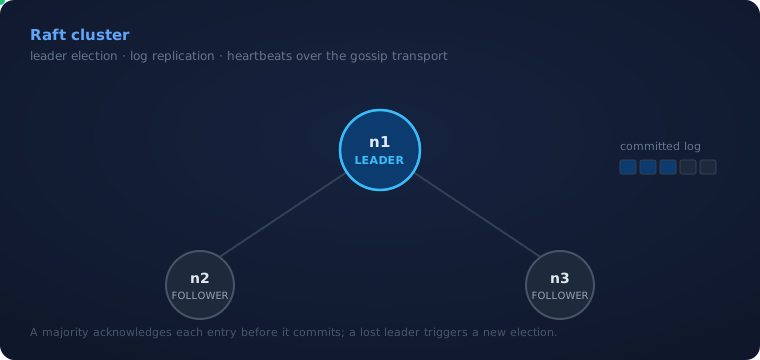
# Each node runs the daemon with the other two as seed peers.
# Addresses below use the documentation range (RFC 5737).
# on n1 (192.0.2.10)
ocifbsd-cluster -n n1 -p 8300 \
    -P n2@192.0.2.11 -P n3@192.0.2.12 -s /var/db/ocifbsd/raft

# on n2 (192.0.2.11)
ocifbsd-cluster -n n2 -p 8300 \
    -P n1@192.0.2.10 -P n3@192.0.2.12 -s /var/db/ocifbsd/raft

# on n3 (192.0.2.12) — same pattern, listing n1 and n2 as peers
# Check status:
ocifbsd cluster status   # role, term, leader, commit index
Describe a whole application — every service, how many replicas of each, the ports they publish, the volumes they mount — in one file, and run it as native FreeBSD jails.
Ensemble is ocifbsd's application-definition format. Instead of starting containers one at a time, you write a single manifest that names each service in your stack and how it should run, and ocifbsd realizes the whole thing on FreeBSD — ZFS-backed images, VNET networking, RCTL limits, and the Raft-backed scheduler placing replicas across your nodes.
It comes in two dialects that share the same vocabulary: a declarative form (one document per object — Deployment, Service, StatefulSet, ConfigMap, and more, separated by ---) for object-at-a-time definitions, and a stack form (a single services: map) for describing an entire application at once. The stack form is the quickest way to stand up a real system, so that's what we'll build here.
The stack shape will look familiar if you've written service manifests before — that's deliberate — but Ensemble is ocifbsd's own format with a defined set of fields (image, ports, volumes, replicas), not a drop-in for any other tool's full schema. A top-level version line is optional; omit it and Ensemble uses its current stack dialect.
# A complete site as one Ensemble stack. Each service names its image,
# the ports it publishes, the volumes it mounts, and how many replicas
# to run — spread across the cluster automatically.
services:
  web:                              # 4 nginx front ends
    image: nginx:1.27
    ports:
      - "443:443"
    volumes:
      - webcontent:/usr/share/nginx/html
    deploy:
      replicas: 4
  api:                              # 3 API servers
    image: myapp/api:2.3
    ports:
      - "8080:8080"
    deploy:
      replicas: 3
  worker:                           # 6 background workers
    image: myapp/worker:2.3
    deploy:
      replicas: 6
  db:                               # primary database
    image: postgres:16
    volumes:
      - pgdata:/var/lib/postgresql/data
  db-replica:                       # 2 read replicas
    image: postgres:16
    volumes:
      - pgreplica:/var/lib/postgresql/data
    deploy:
      replicas: 2
  cache:                            # 3 redis nodes
    image: redis:7
    ports:
      - "6379:6379"
    deploy:
      replicas: 3
volumes:
  webcontent:
  pgdata:
  pgreplica:
Have crufty stack files lying around from somewhere else? Point ocifbsd_convert at one — declarative or stack — and it emits equivalent native ocifbsd configuration, carrying over each service's core shape: its image, published ports, mounted volumes, and replica count.
It converts the structural core, not every directive. Fields like environment, depends_on, and per-service networks are read but not translated — the tool prints a warning to standard error for each, and ocifbsd substitutes its own native VNET networking — while a top-level volumes: map is carried through as a placeholder to fill in. Treat the output as a solid starting point and review it before you run it.
ocifbsd_convert site.yml > site.native.yml

# Native OCI FreeBSD Configuration
# Converted from Ensemble v3
# Generated by ocifbsd_convert

version: "1.0"

name: ensemble-stack
namespace: default

services:
  - name: web
    image: nginx:1.27
    replicas: 4
    ports:
      - "443:443"
    volumes:
      - webcontent:/usr/share/nginx/html
  - name: api
    image: myapp/api:2.3
    replicas: 3
    ports:
      - "8080:8080"
  - name: worker
    image: myapp/worker:2.3
    replicas: 6
  - name: db
    image: postgres:16
    replicas: 1
    volumes:
      - pgdata:/var/lib/postgresql/data
  - name: db-replica
    image: postgres:16
    replicas: 2
    volumes:
      - pgreplica:/var/lib/postgresql/data
  - name: cache
    image: redis:7
    replicas: 3
    ports:
      - "6379:6379"

volumes:
  # Note: Add volume definitions here
Unifying container convenience with proven FreeBSD OS technologies. ocifbsd directly interfaces with kernel subsystems to provide secure, robust, native containerization.